(Loot) Lopscoop App- Rs.60 Sign Up+Rs.10/Refer Free PayTM Cash

Rs.60 Sign Up Bonus From Lopscoop App :
1. First of All Download Lopscoop App from Given Link Here. : Download
2. Now Open App and Skip Introduction Part and Go to Dashboard.
3. Click on MENU Button and then Click on Login and then Login or Sign UP Using your Mobile Number.
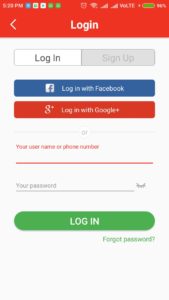
4. Verify your Mobile Number with OTP and go to Login in your Account.
5. Enter Given Refer Code to Get Rs.60 in your EARN Tab > NewBie Task > Fill in the Invitation Code :
DIYB38034
NOTE : READ 3 ARTICLES AND MOVE EACH ARTICLE FROM TOP TO BOTTOM UNTILL “₹” SYMBOL GET FILLED UP.
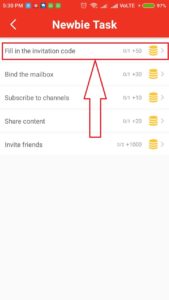
6. Hit the Carry Out Button and Bingo! You are now able to Share your Refer code with your Friends and you will get Rs.60 in your wallet.
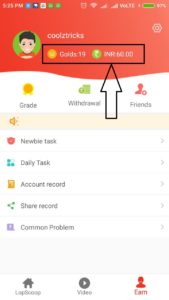
7. Now Start Referring your Friends by Sharing your Refer Code and You will get Rs.10 Per Refer.
8. Minimum Redeem in PayTM Wallet is Rs.150 so you have to Refer 9 More Friends after Sign Up.
Lopscoop Refer and Earn :
1 Go to EARN tab From Bottom of the Page.
2. Click on Friends Icon.
3. Copy your Refer Code and Share it on Social Media along with App Link.
4. You will get Rs.10 PayTM Cash Per Refer when your friend will use your Refer Code.
How To Redeem From Lopscoop App? :
- First of all Go to EARN Tab.
- Click on Withdrawal Option.

- Click on Add PayTM Account Option and Enter your PayTM Registered Mobile Number.
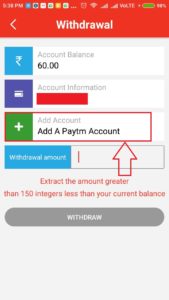
- Minimum Amount to Redeem is Rs.150
- You will get your Earnings after 48 to 72 Hours in your PayTM Account after verification of your Referrals.
(Loot) Lopscoop App- Rs.60 Sign Up+Rs.10/Refer Free PayTM Cash
![(Loot) Lopscoop App- Rs.60 Sign Up+Rs.10/Refer Free PayTM Cash]() Reviewed by Nikku412
on
August 02, 2018
Rating:
Reviewed by Nikku412
on
August 02, 2018
Rating: